IGI – Automatic Therapy
eMotion smart bed – IGI Guide
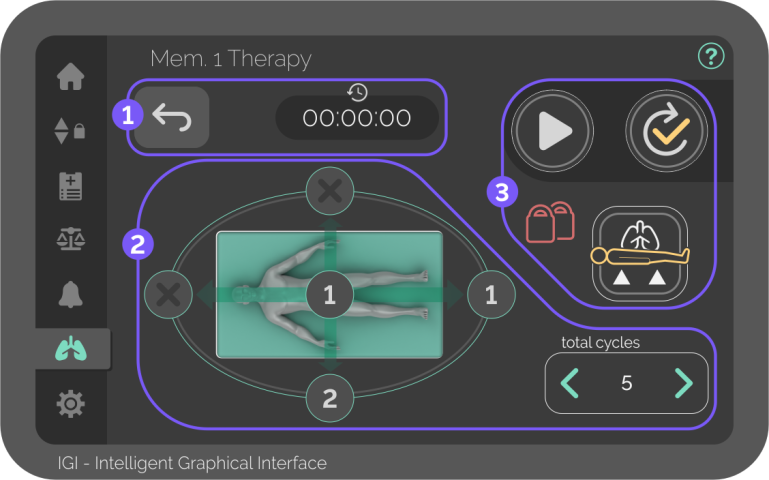
Automatic Full-Rotation Therapy (AFRT)
The Therapy screen controls and displays everything related to the Therapy with automatic motions.
It can be adjusted to the patient’s current condition to either improve pulmonary outcomes or prevent pressure injuries.
Carefully assess the patient’s condition and intubation before using the AFRT, and make sure they can go through the programmed motions.
Carefully assess the bed perimeter before using the AFRT, and make sure it doesn’t collide with anything during the programmed motions.
To start an Automatic Therapy, the bed platform must be horizontal and at a defined height. Use the Therapy Position function for faster positioning.
To start an Automatic Therapy, the side rails must be raised.
To use the Therapy Position function, the function locks can’t be active.
After finishing a Therapy of at least 1 cycle, the time and name of the therapy are automatically saved in the Medical Records screen.

General settings
Choose between therapy configurations and see the current therapy´s elapsed time.

Memories screen
Button – Press to choose between therapy saved memories.
There´s one factory-locked therapy configuration and two programmable memories that automatically save any changes.

Motion configurations
Controls the angles of each position, the time each position is held, and the number of complete cycles in AFRT.
Every cycle starts and ends in the horizontal position.
Motion configurations are only available on the screen at the right side of the bed.
Use the arrows on the “total cycles” interface to increase or decrease the number of complete therapy cycles.

Position configurations
Button – Press any of the four sides of the bed to set the time and angle in that specific position.
The number on the button represents the number of stops in the selected position in each cycle.
If no stop is selected, the button will show an “X”.
The horizontal stop can’t be deselected.

Therapy controls
Controls the playback of the Automatic Therapy.
Aside from Pause, the Therapy controls are only available on the touchscreen at the right side of the bed.
Pressing the menu or using the control panels puts the therapy on pause.
The controls’ background colour changes to green when in play, and to yellow when in pause.

Therapy Position
Button – Press and hold until the icon changes to green in order to start an Automatic Therapy.
A yellow icon means the bed is not yet ready to start therapy.

If padlocks are showing, it means there are locked functions. Go to the Bed Controls screen or use the control panels to unlock it before using the Therapy Position function.

Play
Button – Press Play to start configured automatic motions.
When the therapy starts, the Play button changes to the Pause button, and the Test button to the Stop button.
If not manually stopped, the Automatic Therapy will keep playing until reaching the set number of cycles.

Pause
Button – Press Pause to put current therapy on hold without resetting the timer.
When the therapy pauses, the Pause button changes to the Play button.

Stop
Button – Press Stop to finish current therapy and reset the timer.
When the therapy stops, the Stop button changes to the Test button, and the Pause to the Play button.
When the therapy is stopped, if at least 1 cycle is completed, the therapy data is automatically saved in Medical Records.

Test
Button – Press Test to make 1 complete cycle without stopping between set positions.
When the Test ends, the icon changes to green to indicate safe automatic motions.


