IGI – Bed Info
eMotion smart bed – IGI Guide
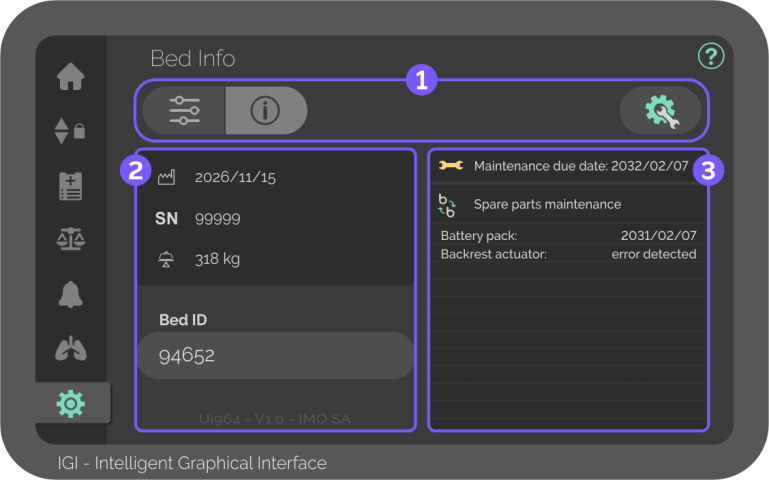
System information and configurations
The Bed Info screen displays bed identification and maintenance data, and provides access to configuration and maintenance screens.
Aside from Bed ID, all information in Bed Info screen is factory-locked.

Sub-menus
Alternate between Configurations, Information, and Maintenance.

Configurations screen
Button – Press to change the system configurations listed below.
- Language
- Weight unit
- Height unit
- Current date
- Current time
- Screen brightness
Changes in configurations can only be made on the touchscreen at the right side of the bed.

Maintenance screen
Button – Press to access maintenance data and configurations.
The maintenance screen is password-protected and can only be modified by certified personnel.

Identification data
Displays the model and interface information.
The “Bed ID” should be used by the hospital staff to differentiate between beds.
At the bottom, the name of the interface and its version is shown, as well as the manufacturer.

Manufacturing date
Signifies exactly when the product was produced, formatted as YYYY/MM/DD.

Serial number
Displays the product’s serial number.

SWL
Displays the Safety Working Weight in kilograms.

Maintenance data
Displays the maintenance due data and component problems.

Maintenance due date
Displays the chosen date for the next maintenance accorded with the client, formatted as YYYY/MM/DD.
The icon will be shown at the top of the Home screen when the due date draws near.
The chosen date can only be modified by certified personnel in the maintenance screen.

Spare parts maintenance
List of errors detected on the bed components that require attention from certified personnel, with date of error formatted as YYYY/MM/DD.

