IGI – Scale
eMotion smart bed – IGI Guide
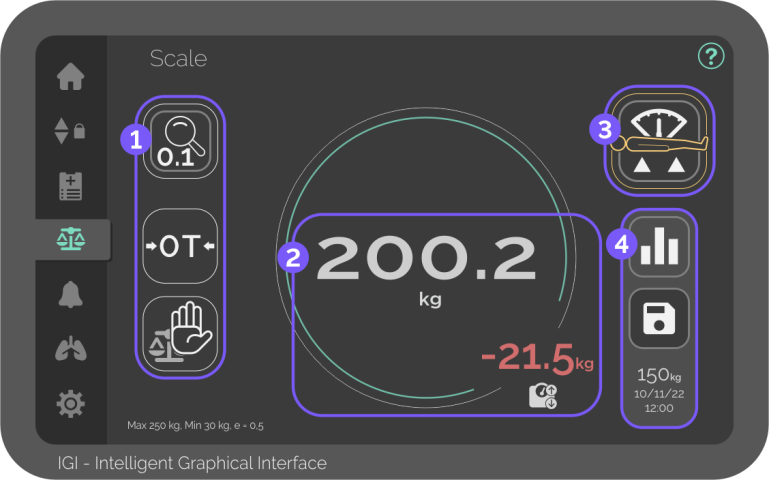
Digital Bed Scale
The Scale screen reads the instant weight of the lying patient, controls scale settings, and lets you save the current weight.
- Maximum reading weight: 250 kg
- Minimum patient weight: 30 kg
- Smallest increment displayed: 0.5(0.1) kg

Scale settings
Controls scale precision and calibration.
To ensure the best results, put the bed in Weighing position before using the scale settings.

Enhanced precision
Button – Press to display the current weight with 100 gr precision for 3 seconds.
The weight can’t be saved with 100 gr precision.

Zero/Tare
Button – Press to set the displayed weight to zero.

Hold weight
Button – Press to add or remove items without removing the patient from bed or interfering with the displayed weight.

Instant weight display
Display, in real time, the current weight in the selected unit and the weight gain/loss since the last saved value.
Yellow value and ring mean that the weight reading is not stabilised.

Weighing position
To ensure precise weight readings, the bed must be in Weighing position.


Weighing position
1-Button for the best weighing position.
Press and hold until the desired position is reached.
The green icon indicates that the bed is in the selected position.
The Weighing position can’t be used if the functions are locked

Saving features
Use the Weight Save function and check the last weight saved instantly.

Weighing history
Button – Press to navigate to the Medical Records screen and access saved weights.

Weight Save
Button – Press to save the current height in the Weighing history.
The green outer ring indicates that the current weight is already saved.
Don´t touch the bed after pressing the Weight save button.


