IGI – Medical Records
eMotion smart bed – IGI Guide
Medical Records – Dashboard
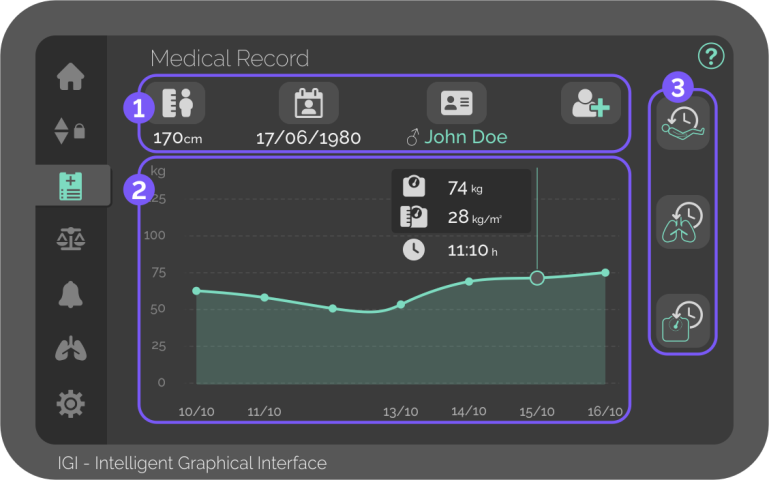
In the Medical Records screen, the patient’s personal data can be inserted, and the treatment’s saved data can be visualised.

Personal data
Patient data can only be edited in the screen on the right side of the bed.

Height
Insert patient height and automatically adjust bed extension, if needed.
The bed uses the patient’s height to calculate the BMI.

Day of birth
Insert patient birthday.

Name
Insert patient name and sex.

New patient
Clears all patient data and insert new patient.
- This function resets all configurations related to the patient:
- • Personal data
- • Treatment records
- • Function locks
- • Safety alarms
- • Scale settings

Weight progress graphic
Weekly overview of the patient’s saved weighings.
Slide the graphic to the side to adjust the timeframe.
- Clicking on saved weights reveals additional information:
- • Exact saved weight
- • BMI on the selected day
- • Time when the weight was saved

Treatments history
Complete list of historical data since patient admission.
Slide the list up and down to see all saved data.

Backrest history
List of all automatically saved times when the backrest is above 30º or 45º, with the day for every registry.
Displays the time passed since the last position change.

Therapy history
List of all manually saved patient weights with time and day for every registry.
Displays the total time elapsed on the current therapy.

Weighing history
List of all manually saved patient weights with time and day for every registry.
Displays the total weight gain/loss since patient admission.


