IGI – Bed Controls
eMotion smart bed – IGI Guide
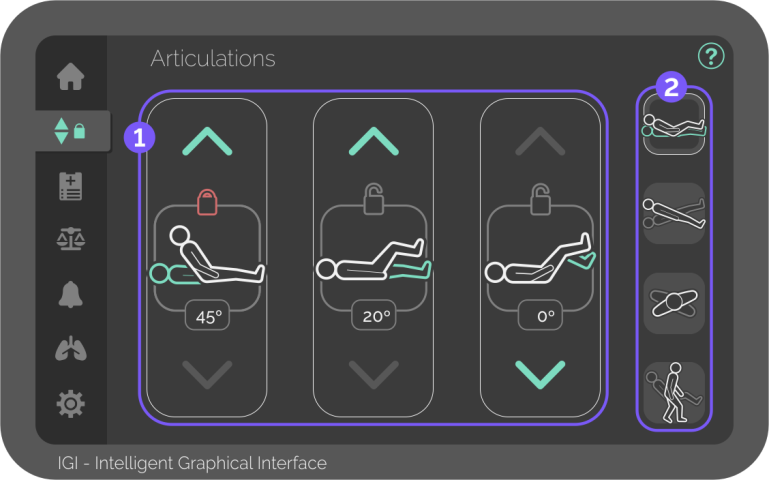
Bed Controls – Articulations
The first sub-menu of the Bed Controls screen includes controls for the bed articulations and shows their positions.

Articulation controls
Yellow values mean that another function is changing its position relative to the ground.

Backrest inclination
Buttons for raising, lowering, and locking the backrest.
Displays the angle relative to the ground (-16º to 87º).

Legrest inclination
Buttons for raising, lowering, and locking the legrest.
Displays the angle relative to the ground (53º to -16º).

Footrest inclination
Buttons for raising, lowering, and locking the footrest.
Displays the angle relative to the ground (16º to -75º).
To achieve the maximum footrest angle, the bed frame must be levelled, avoiding collision with the floor.

Bed controls sub-menu
Navigate through the sub-menu to control other bed movement functions.
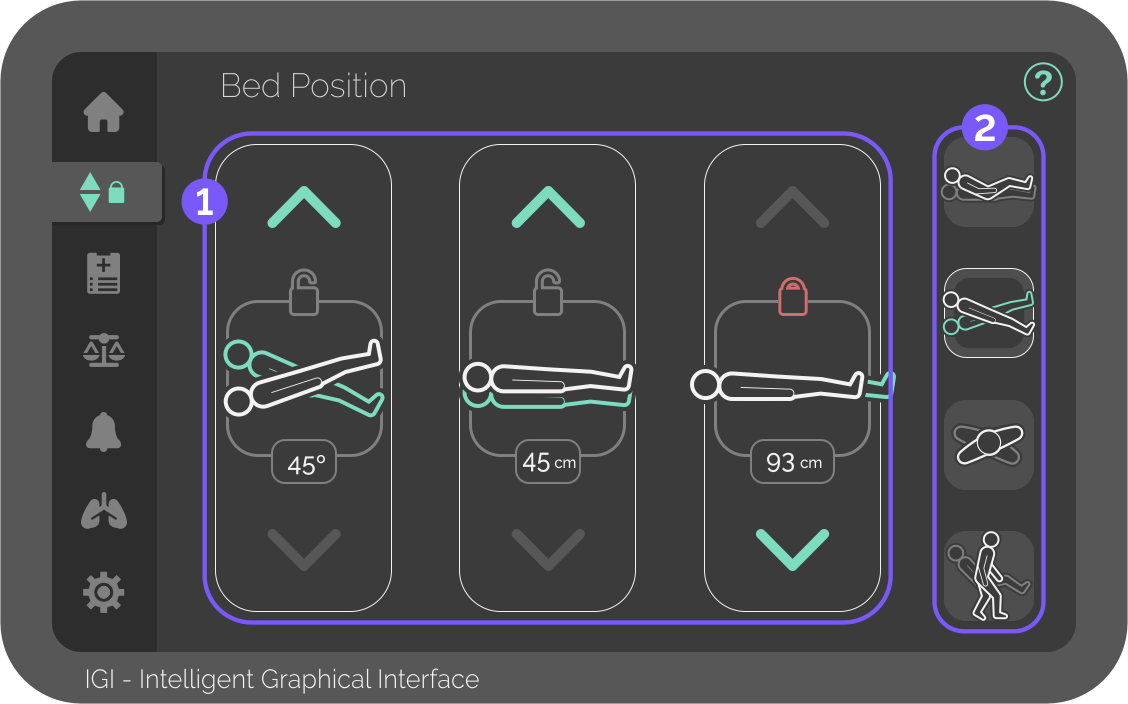
Bed Controls – Bed Position
The second sub-menu of the Bed Controls screen includes controls for the bed frame positioning and shows their positions.
Bed position controls
Yellow values mean that another function is changing its position relative to the ground.

Trendelenburg
Buttons for inclining, reversing, and locking the Trendelenburg.
Displays the angle relative to the ground (-16º to 16º).

Elevation
Buttons for raising, lowering, and locking the bed height.
Displays the bed frame height relative to the ground (46,5cm to 85cm).
The Elevation function can automatically adjust the footrest to avoid colliding with the floor.

Extension
Buttons for extending, retracting, and locking the bed platform.
Displays the maximum patient size (197cm to 213cm).
The Extension function can automatically adjust the footrest to avoid colliding with the floor.
Bed controls sub-menu
Navigate through the sub-menu to control other bed movement functions.
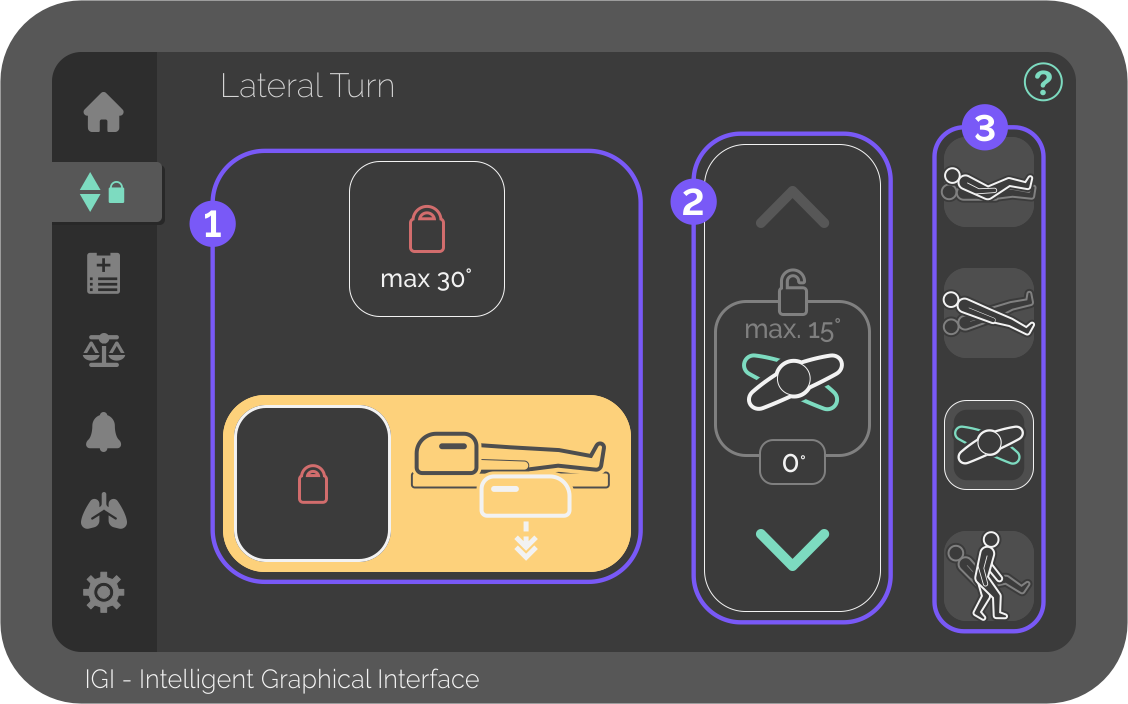
Bed Controls – Lateral Turn
The third sub-menu of the Bed Controls screen is reserved for manual control of the bed’s lateral inclination and shows its position and special locks.
As a safety measure, the bed is predefined with a maximum of 15º of lateral turn.
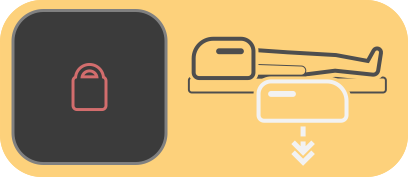
To prevent patients from falling while turning, the bed is also predefined with turn locking while any side rail is lowered.
Automatic locks
Warnings and controls for specially triggered Lateral Turn locks.

30º Turn lock
Button – Locks/unlocks the Lateral Turn function up to 30º.
For safety reasons, it needs to be pressed for 3 seconds to activate/deactivate, and locks automatically after 1 minute.

Lateral Turn controls
Yellow values mean that another function is changing its position relative to the ground.

Lateral Turn
Buttons for raising, lowering, and locking the lateral turn.
Displays the lateral angle relative to the ground (-30º to 30º).

Bed controls sub-menu
Navigate through the sub-menu to control other bed movement functions.
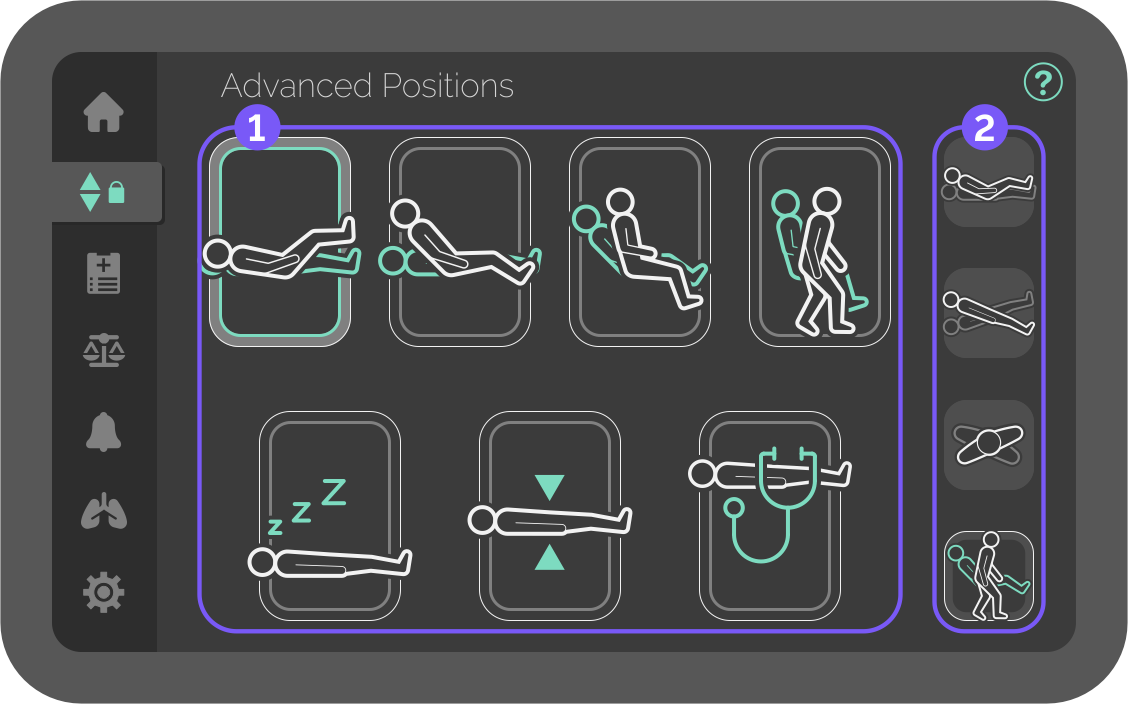
Bed Controls – Advanced Positions
The fourth sub-menu of the Bed Controls screen includes 1-button bed functions.
Advanced Positions controls
Each function moves multiple actuators and is affected by function locks.
The green and light grey outer ring indicates that the bed is in selected function.

Auto Contour position
1-Button backrest and legrest raising.
Press and hold until the desired position is reached.

Cardiac Chair position
1-Button for improved respiratory function.
Press and hold until the desired position is reached.

Upright Chair position
1-Button for 90º raised backrest.
Press and hold until the desired position is reached.

Frontal Exit position
1-Button for bed exit from the foot of the bed. Patient still requires assistance to raise.
Press and hold until the desired position is reached.

Remove foot panel to use Frontal Exit.

Sleep position
1-Button for horizontal and lowered bed platform.
Press and hold until the desired position is reached.

Flat position
1-Button for horizontal bed platform.
Press and hold until the desired position is reached.

Exam position
1-Button for horizontal and raised bed platform.
Press and hold until the desired position is reached.
Bed controls sub-menu
Navigate through the sub-menu to control other bed movement functions.


