IGI – Home
eMotion smart bed – IGI Guide
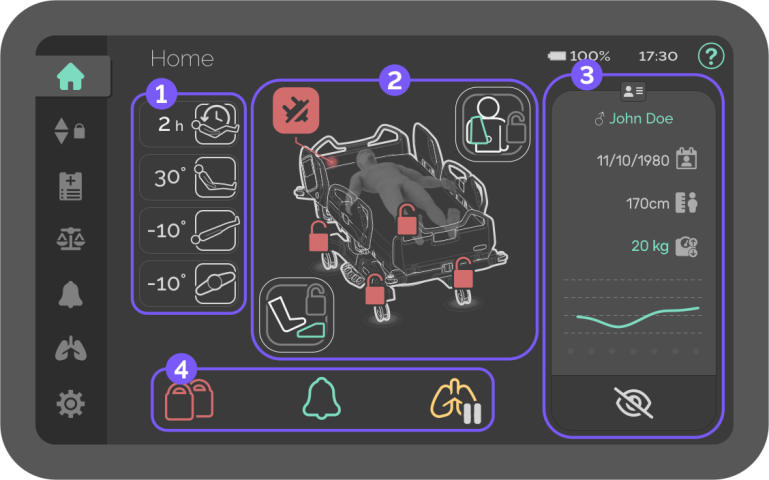
Home – Dashboard Overview
The Home screen shows patient and bed status at a glance.

Bed position
Shows most relevant info for bed positions in real-time.

Time in position
Displays the number of hours without moving from the current position.

Backrest
Displays the angle of the backrest relative to the ground.

Trendelenburg
Displays the angle of bed frontal inclination. Negative values represent reverse Trendelenburg.

Lateral Turn
Displays the angle of bed lateral inclination. Positive values represent raising the patient’s right side.

Special locks
Shows the special locks for the bed and patient safety.

Break alarm
Graphical warning – Appears when the wheels are unlocked without disconnecting the power cable from the hospital outlet.

Patient control lock
Button – Locks/unlocks all articulation functions on patient controls.
The red icon indicates that the patient controls are locked.
For safety reasons, it needs to be pressed for 3 seconds to activate/deactivate.

Foot control lock
Button – Locks/unlocks non-emergency functions on both foot controls.
The red icon indicates that the foot controls are locked.
For safety reasons, it needs to be pressed for 3 seconds to activate/deactivate.

Patient data
Shows the inserted patient’s personal info and a simplified record of the weight history.
- Sex
- Name
- Date of birth
- Height
- Weight lost/gain since admission
- Week’s weight evolution

Sensitive data
Button – Hides/Shows patient’s sensitive data to protect privacy.

Safety features
Shows the general status of locks, alarms, and therapy.


Locks status
Quick overview of the status of the bed motion locks.
- White – All functions unlocked
- Red – At least one function locked


Alarms status
Quick overview of the status of the safety alarms.
- White – All alarms off
- Green – At least one alarm monitoring


Therapy status
Quick overview of the automatic therapy status.
- White – No therapy in use
- Yellow – Current therapy on hold

